ACDSee Photo Studio Professional17.0.2.2652
Publisher Description
Develop Your Photos Like a Pro
Build photo albums you'll be proud to share with ACDSee Photo Studio Professional 2024. The sophisticated RAW image editing and digital asset management toolset is fortified with industry-leading, local Artificial Intelligence (AI) powered features to significantly enhance your photography workflow.
Whats New in Photo Studio 2024?
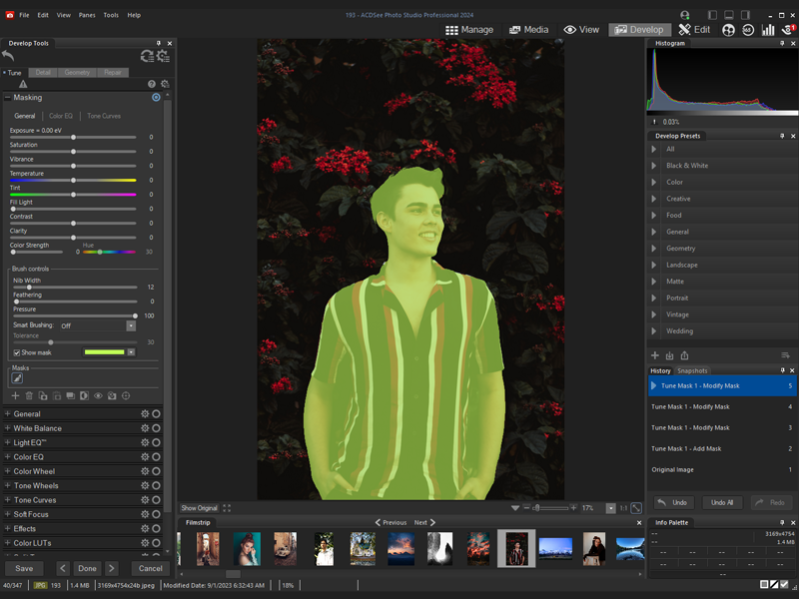
Accomplish more while doing less, with ACDSee Photo Studio Professional 2024. This years release is packed with new and improved locally supported Artificial Intelligence features to make your life easier. Use AI Keywords to search and find photos faster than ever, cutting out the tedium of manually assigning keywords, or hunting through thousands of photos for the perfect one. With the new Develop Mode Masking panel, making complicated masks on your images is now a one-click task with new AI Subject, AI Background, and AI Sky. Create the perfect selections in Edit Mode with the newly added AI Select Subject, Background, and Sky tools. All this, plus overall performance and workflow improvements, take your photo collection from, that's nice, to wow, how did you get that shot!?!
Highly Selective Artificial Intelligence
Save countless hours editing your images, including RAW files, using the new AI masking tools in Develop Mode. The redesigned Masking panel gives you new options to automatically mask the subject, background, or sky in your photos. The new panel also houses the classic brush, linear gradient, and radial gradient tools for efficient mask management. These masks allow you to easily edit specific parts of your photos, while preserving the original file, to truly bring out the best in your photos non-destructively.
Zero-Effort Searching with AI Keywords
Have you ever been looking for that certain photo, one you know you have, but just cant find? Say goodbye to the hunt with zero-effort AI Keywords.
About ACDSee Photo Studio Professional
This Editors program is available in English. It was last updated on 29 September, 2026. ACDSee Photo Studio Professional is compatible with the following operating systems: Windows.
The company that develops ACDSee Photo Studio Professional is ACD Systems International Inc.. The latest version released by its developer is 17.0.2.2652. This version was rated by 4 users of our site and has an average rating of 2.5.
The download we have available for ACDSee Photo Studio Professional has a file size of 6.3 MB. Just click the green Download button above to start the downloading process. The program is listed on our website since 2023-10-18 and was downloaded 486 times. We have already checked if the download link is safe, however for your own protection we recommend that you scan the downloaded software with your antivirus. Your antivirus may detect the ACDSee Photo Studio Professional as malware if the download link is broken.
How to install ACDSee Photo Studio Professional on your Windows device:
- Click on the Download button on our website. This will start the download from the website of the developer.
- Once the ACDSee Photo Studio Professional is downloaded click on it to start the setup process (assuming you are on a desktop computer).
- When the installation is finished you should be able to see and run the program.
Program Details
System requirements
Download information
Pricing
Version History
version 17.0.2
posted on 2023-10-18
Fixed an issue that could cause ACDSee Keywords not to retain their hierarchy when embedded.
version 17.0.1.2637
posted on 2023-10-04
Accomplish more while doing less, with ACDSee Photo Studio Professional 2024. This years release is packed with new and improved locally supported Artificial Intelligence features to make your life easier.
version 16.0.3.2348.53
posted on 2023-03-22
RAW Update 1.4.17.53
Support added:
Canon EOS R6 Mark II, Canon EOS R8, Canon EOS R50
Fujifilm X-H2, Fujifilm X-T5
Hasselblad H5D
OM System OM-5
Support improved:
Fujifilm GFX 100S
Hasselblad CFV II 50c
Nikon D780, Nikon Z6 II, Nikon Z7
OM System OM-1
Sony Cyber-shot DSC-RX100 VA
version 16.0.3.2348
posted on 2022-11-02
Fixed an issue where on first launch on a non-English locale OS, the application did not launch correctly.
Fixed an issue where Quick Search Options Import from 2022 to 2023 always turned off Include ACDSee Metadata and Include ACDSee Keywords options.
version 16.0.0.2324
posted on 2022-09-21
Shape Selection Tool, use the Shape Selection Tool to make complicated selections with curves and corners.
Panorama Stitching, combine photos into a panorama image. Use options like remove vignetting to clean up the edges where the photos meet.
version 15.1.1.1982
posted on 2022-04-13
Fixed keyboard shortcuts not working after the Map pane is opened.
Fixed a rare crash in People mode while grouping unnamed faces.
Corrected color display for the midtones color picker in Edit mode Levels filter.
version 15.0.0.1919
posted on 2021-09-22
Empower Beyond Photography
Kaleidoscopes have the power to inspire the artistic eye to look at life from a different angle. In a similar vein, ACDSee Professional 2022 empowers photographers after the blink of a lens by granting them access to inspirational tools that can shape the world they share
version 15.0.0.1922
posted on 2021-09-22
Improved Noise Reduction, Curve Control, and Gradient Control.
Support for SVG files, Fuji X-S10 RAW files, and 17 more camera models.
Channel Selection, Pixel Targeting with Color Wheel, Squareness Slider, Luminance Range, Noise Reduction for Develop Brush, Selection Preview button, and more!
version 14.0.0.1705
posted on 2020-09-23
The Professionals All-in-One
ACDSee Photo Studio Professional 2021 is for photography professionals who want to perfect their imagery, save time with seamless batch processes, and conquer their image organization. Choose ACDSee and take the limit off your editing and organizational capabilities.
version 14.0.1.1721.0
posted on 2020-09-23
Refine Selection in Edit mode
Presets and History Panes in Develop mode
Color and Tone Wheels in Develop and Edit modes
Support for importing face data from Lightroom and Picasa
RAW support for new cameras
GoPro .GPR file support
The ability to make custom presets for Batch Rename
And more!
